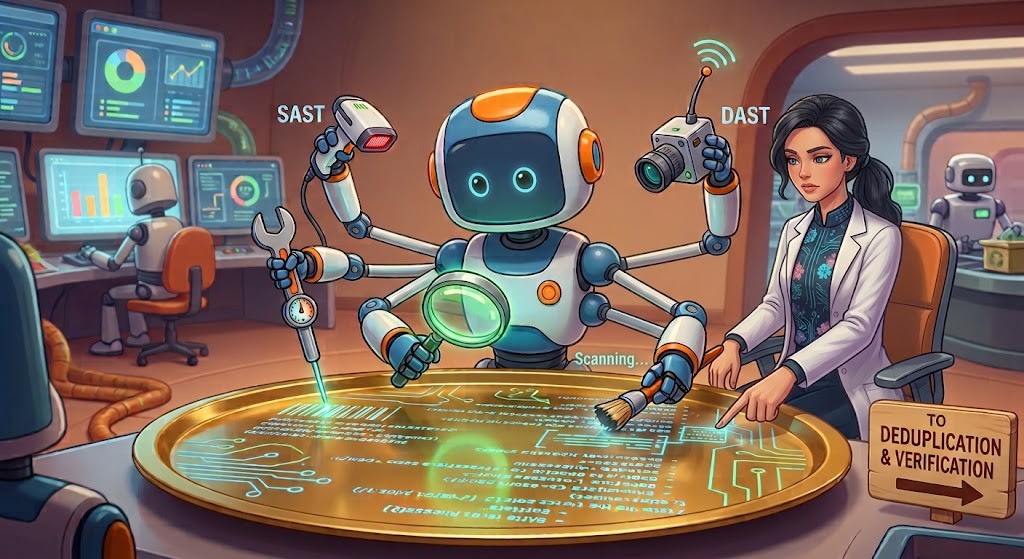
Let’s discuss how to identify possible vulnerabilities (aka “findings”) once we’re prepared to do it.
As we noted earlier, simply pointing a generic AI coding agent at an arbitrary software repository and asking it to discover vulnerabilities can work, in the sense that it may find a vulnerability [Bourzikas2026]. That’s especially true if the software hasn’t been examined by AI before and/or if the AI model is particularly good at program analysis.
However, this trivial approach often doesn’t provide meaningful coverage of real codebases of significant size, nor does it necessarily identify valuable findings. If you want to do a good job of finding and fixing vulnerabilities using AI, you generally want to have a larger process around the AI to help it stay focused. Many systems specifically for finding vulnerabilities add extra process specifically for it [Rogers2025]. Some of the reasons for this need, especially for less-capable models, are:
Context: A single agent’s context window will easily fill if it tries to do too much at once. Even if it doesn’t technically run out of capacity, an AI agent often struggles when it has too much irrelevant information at once. It’s typically better to repeatedly select and focus on a specific issue.
Throughput: Instead of running a single agent at full capacity, it’s better to run multiple agents in parallel. Otherwise, it takes a long time to produce results and won’t adequately examine each potential issue in sufficient depth [Bourzikas2026].
In short, coverage is better when “many agents work on tightly scoped questions and we deduplicate the results afterward, rather than asking one agent to be exhaustive” [Bourzikas2026].
5.1.1 Separate identifying findings from validation
One excellent way to improve results is to separate identifying findings from validating findings. A “finding” is simply a report that might be a vulnerability, but it’s not necessarily one because it’s not clear whether it’s exploitable.
Separating identifying findings from validating them makes finding vulnerabilities more likely:
As [Bourzikas2026] notes, “asking ‘Is this code buggy?’ and ‘Can an attacker actually reach this bug from outside the system?’ are two different questions, and the model is better at each one when you ask them separately, because each question is narrower than the combined version.”
As [Yan2026] reports, “discovery should find as many vulnerabilities as possible—even unlikely ones—and verification should exclude findings that are not actually exploitable. When an agent tries to do both in the same step, it can self-censor and exclude exploitable true positives.”
5.1.2 Helping to identify findings
It’s best to help the AI identify findings. There are many ways to help identify findings when using AI:
In general, give the AI tools. That includes tools for searching and reading code, security tools, and so on. Consider asking the AI what tools it might need and make them available [Yan2026]. Provide the AI with basic tools (e.g., scripting languages like Python) so it can write its own tools to aid in finding (just like a human might).
In particular, use traditional non-AI tools that search for potential vulnerabilities. These include various static analysis tools (examining the source code or binary) and dynamic analysis tools (including fuzzers and web application scanners).
Integrating these traditional tools with AI can be powerful. “Agentic AI is already beginning to help scale vulnerability discovery by leveraging traditional tooling” [Rohlf2025].
Many projects already have a backlog of unreviewed static analysis warnings, and AI agents can help triage them. A 2026 study found that LLM-based agents reduced “an initial [false positive (FP)] detection rate of over 92% on the OWASP Benchmark to as low as 6.3% in the best configuration”. Be careful, however; “aggressive FP reduction can come at the cost of suppressing true vulnerabilities” [Xiong2026].
Many projects already have a backlog of unreviewed static analysis warnings, and AI agents can help triage them. A 2026 study found that LLM-based agents reduced “an initial [false positive (FP)] detection rate of over 92% on the OWASP Benchmark to as low as 6.3% in the best configuration”. Be careful, however: that same configuration wrongly dismissed 22.25% of the real vulnerabilities, with miss rates over 50% in some categories such as weak cryptography, and the authors conclude that FP suppression “should not be fully automated” [Xiong2026].
Use AI to prioritize such warnings, not to silently discard them.
Prioritize especially concerning code. One list suggests code that parses untrusted input, enforces authentication or authorization, or is reachable from the internet [Cycode2026, quoting Anthropic]. The Mozilla Firefox project reports that their “scanning is largely focused on specific areas of the code (files, functions) where we instruct the system to look, based on a mix of human judgment and automated signals.” [Grinstead2026-05]
To find security vulnerabilities, include a search for language-specific issues, insecure coding practices, and improper handling of parameters, variables, and data flows. For each programming language used in the project, apply checks for language- and framework-specific vulnerabilities. Trace parameters and variables, and their usage throughout the code, to detect unsafe patterns, misuse, or inconsistencies [Rogers2025].
Have the model examine and cluster past bugs or at least past vulnerabilities. For vulnerabilities (as determined by your threat model), have it list the relevant vulnerability classes. Then have the AI system determine (for every fix) if the fix was complete and if it applied everywhere else. Look for similar problems. [Yan2026] reported that one team did this and found three exploitable issues in an hour, saying “‘What have people exploited in the past’ is sometimes a much easier cheat-code towards success than ‘find me vulnerabilities in this codebase.’”
Use “top” lists of the most likely kinds of vulnerabilities. At least look specifically for common vulnerabilities. “Most software security issues discovered each year are simply variants or instances of previously discovered patterns, rather than entirely new classes of vulnerabilities” [Rohlf2025]. So if the system you’re analyzing is…
a web application, use the OWASP Top 10 vulnerabilities (for web applications) <https://owasp.org/www-project-top-ten/>. For more thorough coverage, also give the AI the relevant chapters of the OWASP Application Security Verification Standard (ASVS) as a checklist of security requirements to verify [OWASP-ASVS5].
Look for cases where a component assumes another component is doing something, but there’s no test verifying it. “Many vulnerabilities are being found ‘in the seams’ between programs, e.g., a library might not filter headers, even if its spec requires header filtering, but all of the library users might expect the library to filter headers.” [Zimmer2026]
Examine a system’s security properties across transitions (including state transitions) and steady-state data flows. Vulnerabilities can appear during transitions such as authentication and re-authentication, token refresh and expiration, logout and revocation, account or role changes, retries, and recovery flows. Concurrent operations can sometimes interfere with each other. Ask the AI to identify the security invariants that should remain true across transitions and then look for paths where those invariants can be violated [OWASP-ASVS5-V7]
Include important non-security bugs, focusing on critical issues that are likely to cause application crashes, severe malfunctions, or significant instability. Minor or cosmetic issues are less risky, but important “non-security” defects can often be exploited as vulnerabilities. [Rogers2025] claims that “the greatest success I had with policies was a really simple policy of ‘find all bugs, even if they’re not vulnerabilities’”. Consider as bugs cases where the claimed intent (in some documentation including comments) disagrees with the actual code as written. These can be important to fix, and while the system may initially believe they aren’t security-related, they may turn out to be vulnerabilities.
Consider disabling some hardening mechanisms used in production when finding (and later validating). This way, the hardening mechanisms are truly an additional defense-in-depth measure. The result is that the full system, including its hardening mechanisms, is much harder for an adversary to attack successfully. [Grinstead2026-05] We discuss this further in “Disable hardening and evaluate hardening during evaluation”.
Include information on configuration, dependencies, deployment choices, and how components are combined. “Many exploitable issues do [not] appear as obvious defects in application source code” but instead emerge from these kinds of problems [Ziegler2026].
Focus on specific files or specific functions for a given analysis. Many practitioners first use AI to identify the “most important” files and functions to examine, then examine those first.
At the time of this writing, it’s not clear what level of prescription is appropriate. [Yan2026] claims that with frontier models, more prescriptive prompts (such as long checklists) worsen discovery, as they “tend to reduce the model’s creativity and generate fewer novel bugs”. Others don’t report the same. Either way, all the sources we’ve seen agree that providing a threat model and tools is vital.
When requesting findings, include a definition of the output format and content you want. Ask for a structured report with predefined fields, and order them so the model’s reasoning builds on each field. Example fields include rationale, finding, impact, severity, etc. [Yan2026]. Ask for very detailed information about each finding, including a detailed description, filenames, line numbers, the specific triggering input and configuration, relevant URLs, and anything else that would help an AI or human validate it later [Rogers2025]. Ask for a proof of concept (PoC) if it can provide it, but be clear that a PoC is not required and findings should be reported even if it cannot create a PoC. A PoC can simplify later validation if it can be created, but we don’t want to pre-filter findings too early.
Where practical, include provenance needed to reproduce and interpret the result. This can include the source revision examined, relevant environment and configuration, the analysis or verifier invocation that produced the evidence, and the threat-model assumptions used when evaluating the finding. Provenance makes it easier to reproduce a result, determine whether it still applies after the software changes, and distinguish observed evidence from an AI-generated explanation [SARIF2.1].
5.1.3 Managing findings
Track findings systematically (e.g., in an issue tracker or a database), so neither you nor the AI gets overwhelmed or confused. Record each finding’s details and status, and have agents take items from that list.
This may sound overwhelming, but it’s not. Computers are good at creating lists and then having agents select and work on items in parallel depending on your resources. Indeed, [Yan2026] reports that “discovery is now straightforward to parallelize, and the bottleneck has shifted to verification, triage, and patching.”
Remember, not all findings are actual vulnerabilities, and that’s okay. Unfortunately, finding counts can sometimes mislead others. As [Ottenheimer2026-05-26] notes, “Glasswing is NOT confidently reporting tens of thousands of real bugs… like any tool, they are reporting tens of thousands of findings, of which a confident count of real bugs is much smaller.” That doesn’t mean AI is useless; far from it. It’s just that findings need to be validated after they’re found. Repeatedly make it clear that a finding is not a confirmed vulnerability; a finding is a possible vulnerability.
Don’t assume a single run found everything. As we noted earlier, modern AI systems are generally “non-deterministic” (also called “probabilistic”) [Rogers2025]. Re-running may yield additional findings, even if all findings from a previous run were examined. In addition, discovering potential vulnerabilities (and later validating them) can be challenging, since this process involves mathematically undecidable problems in computer science [Rohlf2025]. If done well, this should be a case of diminishing returns. The best way to see how quickly the number of findings is diminishing is to keep re-running finding efforts until the process increasingly comes up empty-handed.
Also, distinguish a successful analysis that produced no findings from an analysis that did not complete. A timeout, model or tool failure, environment failure, insufficient permission, policy denial, or similar interruption is not evidence that no vulnerabilities were found. Automated workflows should record these outcomes separately so that an incomplete analysis cannot silently become a “no findings” result [SARIF2.1].
 Finding and Fixing Vulnerabilities Using AI